My plan
My chosen Atari Game:
Space Invaders
My theme:
Friendly fire between Sea creatures and a mermaid
SPACE INVADER SPRITES TO MAKE
Not sure if you need to match the ratio but just in case, he did 16x16 pixels
- Invaders: Need to make minimum 2 sprites for each sea animal animation
-Laser: bubbles
- missile: starfish
- bunker: Scallops
- background: the ocean =)
Music Reference
•S: 8 Bit Water Stage Loop.wav by Mrthenoronha | License: Attribution NonCommercial 4.0
•
S: Tropical Cruise by code_box | License: Creative Commons 0

Art Progress - Sea Creatures
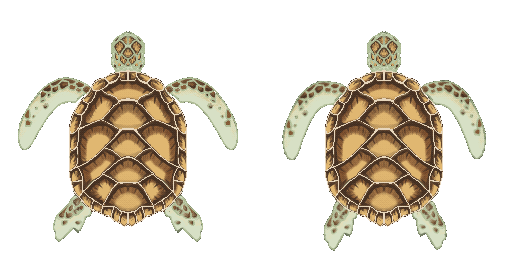
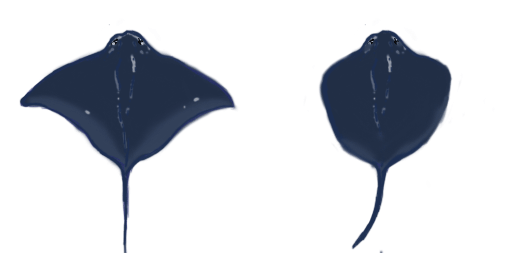
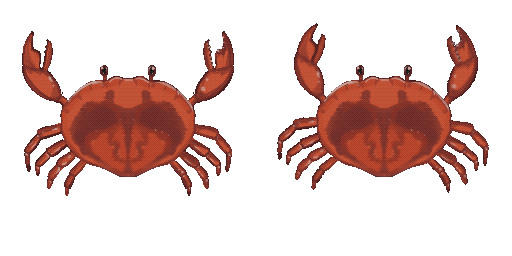
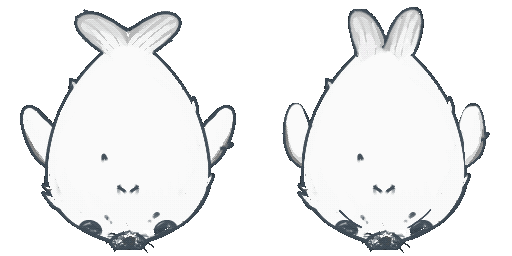
I made all my sea creature sprites on a 256x256 pixel canvas. I started on photoshop and decided to continue making the sprites on procreate instead because I prefer the workflow on procreate. I didn’t worry too much about the sprites being pixelated because I was going for semi-detailed pixel art anyway.
I was happy with how they turned out and enjoyed this process the most.
I made the first sprite, the stingray, on photoshop. But my laptop kept crashing during this, so I resorted to using procreate on my iPad instead to save time.
I took time deciding which sea creatures I wanted in my game cause I had to pick 3 since there’s only 3 invader sprites that were included in the tutorial and I wanted to be more time efficient so I stuck to 3. There were so many sea creatures I wanted to make but in the end I decided on a crab, a stingray and a turtle.
The mystery ship would be a harp seal because compared to the other sea creatures, which can be found in tropical regions, it’s the only one that comes from the colder regions of the ocean and so I decided to make it play as the mystery ship.
Art Progress - Background

李珂, PNGtree

csillarodonyi, ArtStation
It took me a while to find a background reference image for this game's background. Eventually, I found two images to reference from. I used the image to the left to block out the rock formation and where the light source was hitting the rocks that I wanted and the second image for pixel reference and inspiration for making my ocean flora.

Finished background for the main game.
Finished background for the main game. I chose to add so much ocean flora in the back, is to create a habitat suitable for the sea creatures that I created. The habitat I chose is a mixture of open sea and the edge of a coral reef with a kelp forest as a background. The only sea creature that doesn't fit this habitat is the harp seal as mentioned before. Which symbolises the invading trait of the space invaders and makes it perfect as the mystery ship since its unusual for a harp seal to be found in tropical waters.

To make the title page, I reused assets I had already made and used fonts that came with the GitHub project that Zigarous made. Since the fonts were already pixel-inspired.
The new assets I had to make for this was only the UI button, the mermaid and the silhouettes of the sea creatures in the background to give an idea of what the game was about.
The mermaid took the most time to make because I was struggling to find a reference of a woman holding a trident to the front.

So, I made my own reference by using "PoseMy.Art". I used a female model and in place of a trident, I used a the scythe model that was free-to-use. Then found a second reference for the trident.

Art Progress - UI
For the How-to-play page. I created it as a panel that could be activated when the player clicks the "Controls" button.


Here are the buttons I created for the title page. I chose to design them as a closed clam, to add to the ocean-aesthetic.


Here are the back buttons and exit buttons that I used for the title page.
An issue I ran into was that the back button would not work on the main game scene. So you can't go back to the title page from the game. No matter how many times I tried to code it or change the placement of it in the Unity Editor.
Thankfully, I found a solution but in my second game that I worked on, RizzTender.


Bubble
Star fish
Shell
Above are the extra sprites I made to replace the missiles, starfish and bubbles, and the bunker, shell, to add to the ocean aesthetic.
These sprites were also re-used for other areas in the game.

The trident I made for the cursor and the icon of the game.
Coding Progress


Firstly, I followed the tutorial that was given to our class on Canvas. I decided to make the base game first before I did anything else.
It was good practice since I struggled with coding a lot last year and during the summer.

Here, I customized the sprites that the youtuber, Zigurous, provided to temporary be the base colour of the sprites I’m going to replace them with.
From here onwards, I decided to just replace the current sprites that I had in Unity later on when I made the sea creatures and other sprites for the underwater theme I chose.


When I finished the base game, I came across the issue where the missiles would not spawn in game. But all the other mechanics were working fine. I rewatched the missiles section of the tutorial and followed the full code he had in the description, but I wrote the code down fine.

Since I was running out of options with the tutorial, I asked ChatGPT for help and I followed along the instructions it sent me; I made sure that I checked the layer collider matrix and checked which ones were supposed to be unchecked in the video, I tried rewriting some of the code, and I set up a debug line of code to check if the missiles were actually being instantiated or not.
Fortunately they were, and when I got to class in the second week, I found out the issue was because I missed one check in the layer collider matrix.


Below are screenshots of me testing my sprites out in Unity after I finished creating them. I was wary about resizing the colliders around the invaders and I chose to not change the size of the colliders in the end because I was worried that it might affect the script later on; I tested it as is and the game was working fine.


I recoloured my sprites and chose to brighten them for now since I don’t have my new background yet. I also had to flip my sea creature (invaders) sprites so that they would face the mermaid (spaceship).
I rotated the sea creatures by 180 degrees so that they would face the bottom and tested the game to see if it’ll break the game and fortunately the game still worked fine.
I also made the sea creatures a little bit more faster a bit more after they are killed, which was taught to me through the tutorial, so I just adjusted the animation curve.

After looking for other tutorials on how to code the Mystery Ship, and finding none, since the tutorial ended before adding a scoring system and the mystery ship.
I downloaded the project that Zigurous' left in their description under their space invaders turorial and just practiced writing scripts by following his ones.


This is an error that delayed the progress of my game the most.
My missiles were not hitting the invaders for the longest time and it was due to this error.
I asked ChatGPT for help and it gave me a list of instructions to follow. As well as informed my lecturer. But in the end, I figured it out in class; it was a minor issue in the collider matrix and with the help of my lecturer.


When my game was finished, I had a screen ratio problem. I fixed it by changing the screen ratio in project settings to 1080x1080. I also found out the game's ratio doesn't work on full screen even though I changed it to 1080x1080. The game has to be played on a windowed screen or else it will glitch.
I never found out why it didn't work but I assume it had something to do within the Unity editor.

I had fun customising the cursor and the icon for my Space Invaders remake. I ended up changing it into a trident instead because I felt that just having the bubble didn't portray the game the best.

This was the tutorial that I used to make my title page. I found it a bit hard to follow in the end about the back button.
Since the code was clashing with the code that Zigarous made so I ended up not making a back button from the game to the title page.